Master Digital Watercolor with This Brush Bundle
Digital art often struggles to capture the organic unpredictability of traditional media. The Photoshop Watercolor Brush Bundle bridges that gap, offering a toolkit designed for artists who want the fluidity of water-based paint without the mess or drying time. Whether you are a seasoned illustrator or a graphic designer looking to add texture to your layouts, this collection provides the versatility needed to elevate your creative output.
The core appeal of this bundle lies in its ability to mimic natural pigment behavior. By integrating an Auto Texture Edit option, these brushes respond dynamically to your input, creating edges that bleed and blend just like real watercolor on cold-press paper. This functionality allows you to think anew about your workflow, shifting from rigid digital lines to expressive, flowing strokes that feel authentic and original.
Understanding the Technical Specifications
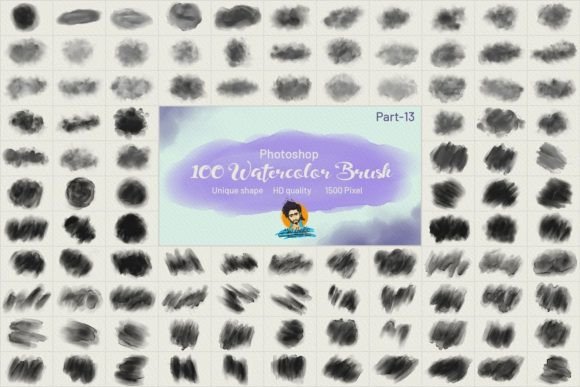
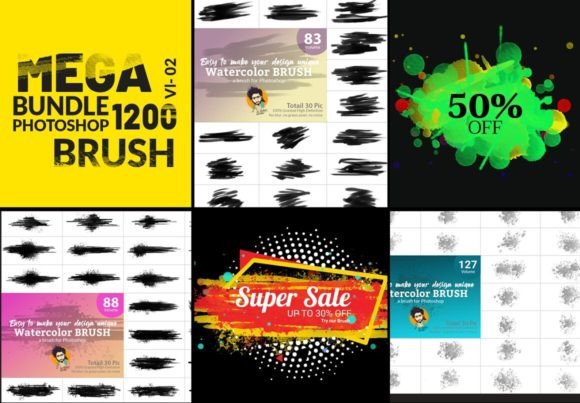
To truly leverage any digital tool, you must understand what is under the hood. This specific bundle includes a massive library of 1200 Photoshop brushes, ensuring that you will rarely find yourself reaching for the same stamp twice. The variety is not just numerical; it covers a spectrum of styles from tight, controlled washes to loose, splattered effects.
- File Format: All brushes are delivered in the standard Photoshop .abr format, ensuring seamless integration with most versions of Adobe Photoshop.
- Resolution: Each brush tip is rendered at high definition, with sizes ranging from 1500 to 2000 pixels. This ensures crisp edges even when working on large-scale prints.
- Print Quality: Optimized for 300 DPI, making them suitable for professional printing standards.
The inclusion of both artificial and natural looks gives you control over the final aesthetic. You can choose a clean, vector-like watercolor style for modern branding projects or opt for a gritty, hand-painted feel for editorial illustrations. The free-hand custom capability means you are not locked into preset shapes; instead, you can manipulate the brush dynamics to suit your specific artistic voice.
Practical Applications Across Industries
The versatility of the Photoshop Watercolor Brush Bundle makes it suitable for any project, regardless of the industry. Here is how different professionals can integrate these tools into their daily workflows.
Branding and Marketing
In a digital landscape saturated with flat design and minimalism, watercolor textures offer a warm, human touch. Marketers can use these brushes to create unique background elements for social media campaigns, email headers, or product packaging. The ability to set any color while maintaining a perfect look ensures that your brand palette remains consistent while adding depth and interest. A soft watercolor wash behind a logo can soften corporate imagery, making it more approachable and engaging for consumers.
Educational and Editorial Content
Educators and publishers often need visuals that are informative yet visually appealing. Watercolor illustrations are excellent for breaking down complex topics because they feel less intimidating than technical diagrams. Bloggers and content creators can use these brushes to create custom featured images that stand out in search results. The natural flavor of the brushes helps maintain reader engagement by providing a break from stock photography.
Freelance Illustration
For freelancers, speed is often as important as quality. The dynamic nature of these brushes allows for rapid prototyping and finishing. Instead of spending hours layering multiple opacity masks to simulate transparency, you can achieve similar results in a few strokes. This efficiency translates directly to higher productivity and the ability to take on more client work without sacrificing artistic integrity.
Enhancing Workflow with Dynamic Features
One of the standout features of this collection is the Auto Texture Edit option. Traditional digital brushes can sometimes feel repetitive, leaving obvious patterns that betray their digital origin. This bundle mitigates that issue by varying the texture application based on pressure and speed. This results in a very natural and original watercolor flavor that evolves as you draw.
Moreover, the brushes are easy to set up for any type of design. You do not need to be a technical wizard to adjust the settings. Whether you are working on a tablet with pressure sensitivity or using a mouse, the brushes adapt to provide a satisfying user experience. The dynamic brush engine ensures that every stroke feels responsive, giving you the confidence to experiment with bold choices.
Learning and Implementation Tips
While having 1200 brushes at your disposal is powerful, it can also be overwhelming. To get the most out of the Photoshop Watercolor Brush Bundle VL 02, consider starting with a subset of brushes that match your current project’s mood. Do not try to master all 1200 at once. Instead, pick five to ten favorites and learn their nuances.
We are releasing a video demonstrating these techniques in action. Watching the process can reveal tricks that static images cannot convey. In the tutorial, you will see how to layer different brushes to build depth, how to adjust flow settings for softer edges, and how to combine these watercolor elements with typography. I hope you will benefit from it, as seeing the brushes in motion clarifies their potential.
When implementing these brushes, remember that less is often more. Watercolor is defined by its transparency and light. Avoid overworking your digital canvas. Let the white space breathe, and use the brushes to suggest form rather than define it rigidly. This approach maintains the airy, delicate quality that makes watercolor so beloved.
Final Thoughts on Value and Usability
Investing in a high-quality brush set is an investment in your creative efficiency. The Photoshop Watercolor Brush Bundle offers a comprehensive solution for anyone looking to incorporate organic textures into their digital work. With its high-resolution assets, diverse style options, and user-friendly dynamics, it removes the technical barriers between your imagination and the screen.
Whether you are designing a wedding invitation, illustrating a children’s book, or creating assets for a mobile app, these tools provide the flexibility you need. The combination of artificial precision and natural randomness ensures that your designs remain beautiful and unique. By integrating these brushes into your toolkit, you open up new avenues for expression, allowing you to create work that resonates emotionally with your audience.