Mastering Digital Typography with Kota Lettering Procreate Brushes
The landscape of digital illustration has undergone a significant transformation in recent years, shifting from complex desktop software to intuitive, touch-based interfaces that empower artists to create professional-grade work on the go. At the heart of this revolution is Procreate, an application that has become synonymous with digital artistry on the iPad. However, the tool is only as powerful as the assets used within it. For designers, illustrators, and hobbyists looking to elevate their typographic work, Kota Lettering Procreate Brushes represent a specialized toolkit designed to bridge the gap between hand-drawn authenticity and digital precision. This comprehensive suite offers more than just standard stroke tools; it provides a curated environment for creating logos, illustrations, and textured backgrounds that resonate with organic warmth.
The Evolution of Hand-Lettering in a Digital Space
Traditional hand-lettering requires years of practice to master pressure control, ink flow, and paper texture. When these elements are translated to a glass screen, artists often struggle to retain the natural imperfections that give lettering its character. Standard digital brushes can feel too uniform or sterile, lacking the grit and variation found in physical media. This is where specialized brush sets like Kota Lettering Procreate Brushes become essential. They are engineered to mimic the tactile feedback of real-world tools, allowing the artist’s hand movements to translate into strokes that possess weight, texture, and personality.
By integrating these tools into their workflow, creators can bypass the steep learning curve associated with configuring custom brushes from scratch. Instead of spending hours adjusting streamline settings, opacity jitter, and shape dynamics, users can immediately focus on composition and style. The result is a workflow that feels less like operating software and more like drawing with a trusted pen or brush, fostering a deeper connection between the creator’s intent and the final output.
Comprehensive Toolkit Breakdown
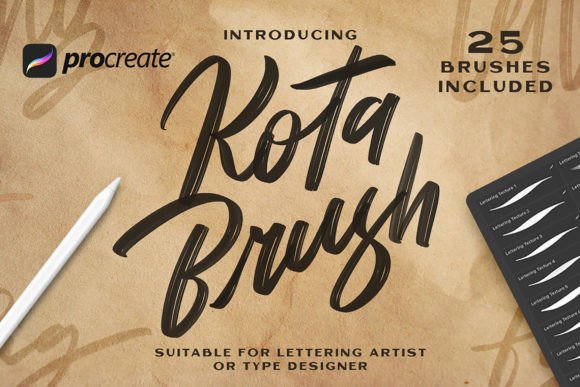
Understanding the value of this package requires a closer look at its components. The collection is not merely a random assortment of tools but a cohesive system designed to handle various stages of the design process. The package includes 25 Lettering Texture Brushes and 25 Procreate Brushes, totaling fifty distinct tools that cater to different artistic needs. This duality allows for a layered approach to design, where structural forms can be established with clean lines and then enriched with textural details.
The Lettering Texture Brushes are particularly valuable for adding depth to flat designs. In graphic design, texture is often the differentiator between a generic logo and a memorable brand identity. These brushes simulate effects such as dry ink, chalk dust, watercolor bleed, and rough pencil grain. When applied to letterforms, they break up the perfect digital edges, introducing a human element that appeals to audiences seeking authenticity. Meanwhile, the core Procreate Brushes provide the foundational strokes necessary for constructing the letters themselves. These are optimized for smooth curves and consistent weight, ensuring that the legibility of the text is never compromised by the artistic flair.
Streamlined Installation and Accessibility
One of the most common barriers to adopting new digital assets is the complexity of installation. Many users find file management on tablets confusing, especially when dealing with proprietary file formats. The developers of Kota Lettering Procreate Brushes have prioritized user experience by simplifying this process. The package comes with a clear Readme file and straightforward instructions on How to install the assets.
The process is designed to be seamless across devices. Users begin by unzipping the downloaded file on their iPad or computer. The key file type here is the .brushset extension, which is native to Procreate. Using the Files App on iOS, users simply tap each of the .brushset files to instantly import them into the application. There is no need for third-party converters or complex directory navigation. Once imported, the brushes appear directly in the Brushes panel, organized and ready for immediate use. This ease of access ensures that even those who are not technically inclined can start creating within minutes of purchase.
Practical Applications for Diverse Creators
The versatility of Kota Lettering Procreate Brushes extends beyond simple calligraphy. Because the toolkit includes everything needed for making logos, illustrations, or special backgrounds, it serves a wide array of professional and personal projects. Understanding how to apply these tools in specific contexts can help users maximize their investment.
- Brand Identity and Logo Design: Small businesses and startups often seek logos that feel approachable and artisanal. Using the texture brushes, designers can create wordmarks that look hand-stamped or painted, conveying a sense of craftsmanship and care that vector-based logos sometimes lack.
- Social Media Content Creation: Influencers and content creators require unique visual assets to stand out in crowded feeds. These brushes allow for the rapid creation of custom quotes, headers, and decorative elements that maintain a consistent aesthetic across posts.
- Editorial Illustrations: Magazine and blog editors often need headers that complement the tone of an article. The ability to quickly generate textured, hand-lettered titles adds a layer of sophistication and editorial flair to digital publications.
- Packaging Design: For product designers, creating mockups with hand-lettered elements can enhance the perceived value of a product. The organic feel of these brushes works exceptionally well for labels on artisanal foods, cosmetics, and craft beverages.
Workflow Integration and Technique
Using a brush is very simple, but mastering its potential requires understanding how it interacts with other Procreate features. The basic operation involves placing brush strokes and selecting the appropriate brush from the brush panel. However, advanced users can leverage additional tools to enhance the effect. For instance, combining the Kota Lettering Procreate Brushes with Procreate’s blending modes can create complex visual interactions. A texture brush set to "Multiply" can add shadow and depth, while one set to "Overlay" can introduce highlights and grain without obscuring the underlying color.
Furthermore, the pressure sensitivity of the Apple Pencil plays a crucial role. These brushes are calibrated to respond dynamically to pressure and tilt. A light touch might produce a faint, sketchy line, while firm pressure yields a bold, saturated stroke. This dynamic range allows for expressive variation within a single letterform, mimicking the natural acceleration and deceleration of a hand holding a physical brush. Artists are encouraged to experiment with speed as well; faster strokes often result in cleaner lines, while slower, deliberate movements allow the texture algorithms to deposit more digital "ink," creating richer effects.
Considerations for Professional Use
While Kota Lettering Procreate Brushes offer immense creative freedom, professionals must consider the final output format. Digital textures are raster-based, meaning they are composed of pixels. For large-scale printing, such as billboards or vehicle wraps, resolution becomes critical. Users should ensure their canvas size and DPI (dots per inch) settings are appropriate for the intended print dimensions before beginning their work. Starting with a high-resolution canvas allows the intricate details of the texture brushes to remain sharp when scaled down, whereas upscaling a small canvas can lead to pixelation and loss of detail.
Additionally, while these brushes excel at creating organic looks, they may not be suitable for projects requiring strict geometric precision or corporate minimalism. In such cases, they can still be used for secondary elements, such as background patterns or accent graphics, while primary typography remains clean and vector-based. Understanding the appropriate context for these tools ensures they enhance rather than detract from the overall design objective.
Enhancing Creativity Through Limitation
Paradoxically, having a curated set of tools can boost creativity more than having unlimited options. When faced with thousands of generic brushes, artists often suffer from decision paralysis. By limiting the toolkit to the 25 Lettering Texture Brushes and 25 Procreate Brushes included in this package, creators are forced to explore the full potential of each tool. This constraint encourages experimentation with layering, opacity, and composition, leading to more distinctive and thoughtful outcomes.
The inclusion of a Readme guide also serves as an educational resource, offering tips on best practices and maintenance. As Procreate updates its software, brush compatibility can sometimes shift. Having clear documentation ensures that users can troubleshoot any issues and keep their tools functioning optimally. This support structure reflects a commitment to long-term usability, making the package a reliable asset in a designer’s digital library.
In conclusion, Kota Lettering Procreate Brushes provide a robust solution for anyone looking to infuse their digital work with human warmth and textual richness. From the simplicity of installation to the depth of artistic possibility, this toolkit empowers users to create professional-quality logos, illustrations, and backgrounds with ease. By integrating these brushes into their workflow, creators can achieve a level of authenticity that resonates with audiences, bridging the gap between traditional craftsmanship and modern digital efficiency.