FlowStamp Procreate Brushes: A Practical Toolkit for Faster Digital Design
Digital illustration often feels like a race against time. Whether you are designing a logo for a client, sketching out concepts for a new product, or simply trying to capture a fleeting idea before it disappears, the friction of creating every single element from scratch can slow you down. This is where specialized toolkits become less about shortcuts and more about workflow efficiency. FlowStamp Procreate Brushes represents a curated collection designed to bridge the gap between blank canvas anxiety and finished artwork. By providing pre-made, high-quality stamp elements, this package allows artists to focus on composition and storytelling rather than repetitive rendering.
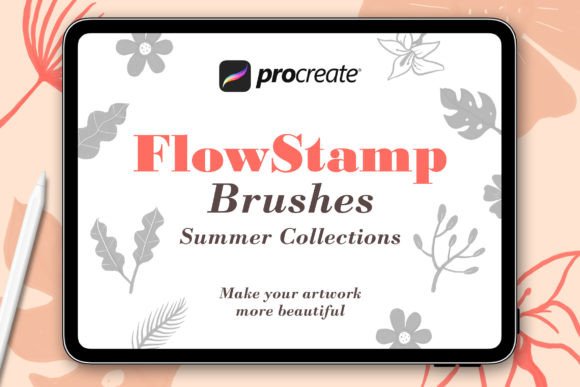
At its core, this toolkit is straightforward. It includes twenty-five distinct stamp brushes featuring flowers and leaves, alongside a readme file and installation instructions. But labeling it merely as a set of floral stamps undersells its utility in professional and hobbyist workflows. The real value lies in how these assets integrate into the iPad’s native environment, allowing users to place complex shapes with a single tap while retaining the organic feel of hand-drawn art.
Accelerating Brand Identity and Logo Design
For graphic designers and brand strategists, speed is often synonymous with profitability. When developing visual identities for boutique brands—particularly those in wellness, beauty, or artisanal goods—organic motifs are frequently requested. Hand-lettering combined with botanical elements is a staple aesthetic in these industries. Without tools like FlowStamp Procreate Brushes, a designer might spend hours perfecting the curvature of a leaf or the petal structure of a rose, only to have the client request a different arrangement.
Using stamp brushes changes this dynamic entirely. You can rapidly prototype multiple layout options during a client meeting. Need a wreath around a monogram? Instead of drawing each leaf individually, you can layer various flower and leaf stamps, adjusting their opacity and color to create depth and uniqueness. This approach allows for rapid iteration. You can present three distinct concepts in the time it would normally take to finalize one. The key here is customization; because these are brushes within Procreate, they are not static clipart. You can rotate, resize, and recolor them instantly, ensuring the final logo feels bespoke rather than templated.
Elevating Social Media Content Creation
Influencers, content creators, and small business owners live and die by their visual consistency. Platforms like Instagram and Pinterest demand high-volume, aesthetically pleasing content. Creating unique backgrounds for quote cards, product announcements, or story highlights can be tedious. This is where the background-building capability of FlowStamp Procreate Brushes shines.
Imagine needing a soft, textured background for a skincare product launch. By scattering leaf stamps with low opacity and varying sizes, you can create a subtle, organic texture that adds visual interest without overpowering the text or product image. This technique adds a layer of professionalism that flat colors often lack. Furthermore, because the brushes are vector-like in their scalability (within the limits of raster graphics), they remain crisp on high-resolution screens. Creators can develop a signature style by consistently using specific color palettes with these stamps, making their feed instantly recognizable to followers.
Streamlining Illustration and Pattern Design
Surface pattern designers face the challenge of creating seamless, engaging repeats that do not look mechanical. While traditional methods involve complex grid calculations and manual duplication, stamp brushes offer a more intuitive entry point. Artists can use the twenty-five included flowers and leaves to build dense, lush compositions quickly.
Consider an illustrator working on a children’s book featuring a garden scene. Drawing every blade of grass and individual blossom is exhausting and often unnecessary for the narrative flow. By using FlowStamp Procreate Brushes to populate the foreground and mid-ground, the artist can reserve their detailed rendering skills for the main characters. This hierarchy of detail guides the viewer’s eye effectively. Additionally, these stamps serve as excellent underpaintings. An artist can lay down a loose structure using the stamps and then paint over them, using the underlying shapes as a guide for lighting and perspective. This hybrid method combines the speed of digital assets with the soul of traditional painting.
Practical Considerations Before You Begin
While the benefits are clear, integrating any new brush set requires a shift in mindset. One common misconception is that stamp brushes will do all the work for you. In reality, they are building blocks. If you simply place them side-by-side without variation, the result will look artificial and repetitive. To achieve a natural look, you must embrace imperfection. Vary the rotation angles, adjust the pressure sensitivity if supported, and experiment with blending modes.
Another consideration is resolution. Since these are raster-based brushes within Procreate, their quality depends on your canvas size. If you plan to use these designs for large-format printing, such as banners or wallpaper, ensure you start with a sufficiently large canvas. For digital-only use, such as web graphics or social media, the default settings are generally more than adequate.
Installation and Setup Simplicity
One of the strongest selling points of this package is its ease of use. Many digital artists hesitate to try new tools due to complicated installation processes involving desktop software or cloud conversions. FlowStamp Procreate Brushes eliminates this barrier. The process is designed for the modern iPad user:
- Unzip the File: Start by unzipping the downloaded file directly on your iPad or computer. The Files app on iOS handles this seamlessly.
- Transfer to iPad: If you downloaded it on a computer, AirDrop or iCloud Drive makes transferring the .brushset files effortless.
- Import Instantly: Using the Files App, simply tap each of the .brushset files. Procreate will automatically recognize the format and import them into your Brushes panel.
This frictionless setup means you can go from purchase to creation in minutes. There is no need for third-party converters or complex folder structures. The brushes appear in your library, ready to be customized or used as-is.
Who Benefits Most from This Toolkit?
The versatility of FlowStamp Procreate Brushes means it serves a diverse audience. Professional illustrators benefit from the time saved on repetitive elements, allowing them to take on more commissions. Hobbyists find joy in the immediate gratification of creating beautiful compositions without needing years of botanical drawing training. Small business owners gain a cost-effective alternative to hiring a designer for every minor graphic need. Even educators can use these tools to create engaging visual aids for lessons on nature or biology, making abstract concepts more tangible through appealing visuals.
Ultimately, the value of this package lies in its ability to remove technical barriers. It allows the creator to stay in the flow state, focusing on creativity rather than mechanics. Whether you are crafting a delicate wedding invitation suite or a bold poster design, these brushes provide the foundational elements needed to bring your vision to life efficiently. By understanding how to layer, modify, and integrate these stamps, you unlock a faster, more flexible approach to digital art that respects both your time and your artistic integrity.