Hearts Lights Bokeh Procreate Brushes: A Practical Tool for Valentine’s Day Design
As Valentine’s Day approaches, digital creators and designers often find themselves searching for efficient ways to produce romantic, eye-catching visuals without sacrificing quality or time. The pressure to deliver polished social media graphics, greeting cards, or marketing materials can be intense during this peak season. In this context, specialized tools like the Hearts Ligths Boken Procreate Brushes offer a streamlined solution for generating atmospheric backgrounds and decorative elements. This article evaluates the utility, installation process, and practical application of this specific brush set, helping you determine if it aligns with your current workflow and creative goals.
Understanding the Core Functionality
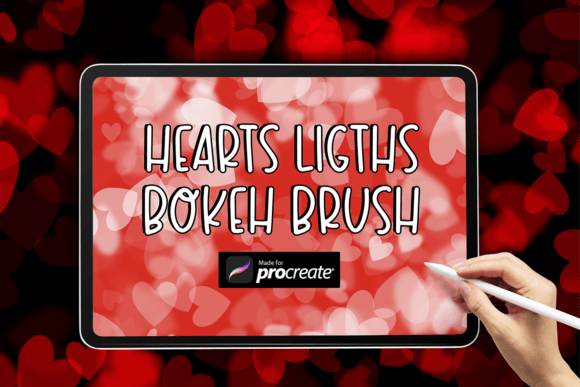
The Hearts Ligths Boken Procreate Brushes are designed with a singular but highly effective purpose: to create soft, heart-shaped bokeh effects. Bokeh, a photographic term referring to the aesthetic quality of the blur in out-of-focus areas of an image, is a popular technique in digital art for adding depth and warmth. By shaping these light blurs into hearts, the brush immediately conveys themes of love, affection, and celebration, making it particularly relevant for February projects.
Unlike complex brush packs that require extensive configuration, this tool focuses on simplicity. It allows users to paint light sources that naturally blend into the background, creating a dreamy, ethereal atmosphere. The primary strength of this asset lies in its customizability. While the shape is fixed as a heart, the color palette is entirely up to the user. This flexibility means the same brush can be used for traditional red and pink Valentine’s designs or adapted for more modern, minimalist aesthetics using pastels, golds, or even monochromatic tones.
Installation and Usability
For many Procreate users, especially those who are not technically inclined, the barrier to entry for new digital assets is often the installation process. Fortunately, the workflow for the Hearts Ligths Boken Procreate Brushes is straightforward, though it requires attention to detail regarding file management on the iPad.
The package is delivered as a compressed ZIP folder. To install the brush, you must first download this folder directly onto your iPad. Once downloaded, you need to extract the contents to reveal the individual .brush file. This step is crucial; Procreate cannot import the ZIP file directly as a brush set. After extraction, you should open the Files app, locate the .brush file, and tap it. If Procreate is installed correctly on your device, it will automatically open the application and import the brush into your currently selected brush library.
This process is standard for most third-party Procreate brushes, but it is worth noting for beginners. The simplicity of having only one brush file also reduces clutter in your library. You do not need to sift through dozens of variations to find the right tool. Instead, you have a single, reliable instrument that performs one task well.
Practical Applications in Real-World Projects
The true value of any digital tool is revealed in its application. The Hearts Ligths Boken Procreate Brushes excel in scenarios where background texture and mood are prioritized over intricate detail. Here are several practical use cases where this brush demonstrates its effectiveness:
- Social Media Graphics: Instagram stories and Pinterest pins often benefit from subtle background textures. Using this brush with low opacity can create a soft, romantic backdrop that does not compete with text overlays or product images.
- Digital Greeting Cards: For designers creating printable or digital Valentine’s cards, the brush can add a layer of depth behind central illustrations or typography, enhancing the emotional resonance of the design.
- Marketing Materials: Small business owners promoting Valentine’s specials can use the heart bokeh effect to frame promotional text, drawing the viewer’s eye toward the center of the composition while maintaining a festive theme.
- Photo Editing: Photographers using Procreate for retouching can overlay these heart lights on portrait photos to add a whimsical, celebratory touch without needing advanced Photoshop skills.
In each of these scenarios, the ability to change the color dynamically is a significant advantage. A marketer targeting a luxury audience might use deep burgundy and gold hearts, while a brand focusing on friendship might opt for soft lavenders and yellows. This adaptability extends the lifespan of the brush beyond a single holiday, allowing it to be used for anniversaries, weddings, or general romance-themed content year-round.
Evaluating Quality and Consistency
When assessing the Hearts Ligths Boken Procreate Brushes, consistency is a key metric. A high-quality brush should respond predictably to pressure and tilt, although bokeh brushes often rely more on spacing and scatter settings than traditional painting dynamics. Users can expect a uniform distribution of heart shapes that blend smoothly with the underlying layers when using blending modes such as Screen, Add, or Color Dodge.
The presentation of the brush is minimalistic, which aligns with its functional nature. There are no unnecessary frills or complex settings to adjust. This "plug-and-play" approach is beneficial for professionals working under tight deadlines. However, it also means that users seeking highly textured, grunge-style, or irregular light effects may find this brush too clean or uniform. It is designed for elegance and clarity, not chaos.
From a reliability standpoint, the single-file format ensures that there are no compatibility issues between multiple brush variants. Once imported, the brush behaves consistently across different canvas sizes and resolutions, provided the iPad has sufficient processing power to handle the layer complexity. For most modern iPads, performance is seamless.
Who Benefits Most from This Tool?
The Hearts Ligths Boken Procreate Brushes are not a universal solution for all digital artists, but they are highly valuable for specific audiences. Freelance graphic designers who frequently handle seasonal campaigns will appreciate the speed at which they can generate thematic backgrounds. Similarly, social media managers and content creators who need to produce high volumes of visually appealing posts will find this tool efficient.
Educators and hobbyists exploring digital art may also benefit, as the brush provides an easy entry point into understanding how lighting and blending modes work in Procreate. By experimenting with this brush, users can learn how light interacts with color and how to create depth without manual painting techniques.
However, professional illustrators who specialize in hand-drawn, detailed artwork may find limited use for this asset unless they are specifically working on layout or background tasks. It is a supplementary tool rather than a primary drawing instrument.
Final Considerations for Your Workflow
Incorporating the Hearts Ligths Boken Procreate Brushes into your toolkit requires a clear understanding of your project needs. If your goal is to create soft, romantic, and visually engaging backgrounds quickly, this brush delivers on its promise. Its strength lies in its simplicity and the immediate visual impact of the heart-shaped bokeh effect.
Before downloading, ensure you are comfortable with the basic file extraction process on your iPad. Once installed, experiment with different blending modes and opacity levels to maximize the versatility of the single brush file. Remember that while the shape is fixed, your creativity in color selection and composition determines the final outcome.
Ultimately, this tool represents a practical investment for anyone looking to streamline their Valentine’s Day design process. It offers a balance of aesthetic appeal and functional ease, making it a worthy addition to the libraries of marketers, creators, and small business owners aiming to capture the spirit of the season with professionalism and efficiency.