Mastering Digital Lettering with the Procreate Calligraphy Brushset for iPad
The transition from traditional paper to a digital canvas is one of the most significant shifts in modern graphic design and illustration. For many artists, the tactile resistance of a nib against paper is irreplaceable. However, the versatility, undo capabilities, and layer management offered by digital tools are undeniable advantages. At the heart of this digital transformation is the Procreate Calligraphy Brushset for iPad, a collection designed to bridge the gap between classical elegance and modern efficiency. This article explores how such tools can elevate your creative workflow, offering practical insights into their features, applications, and considerations for both beginners and seasoned professionals.
Understanding the Digital Calligraphy Landscape
Digital calligraphy is not merely about replicating ink on a screen; it is about reimagining how letters are formed. When you utilize a specialized Procreate Calligraphy Brushset for iPad, you are accessing algorithms that mimic the physics of real-world brushes, pens, and markers. These tools respond to pressure, tilt, and speed, allowing for dynamic line variation that static fonts cannot achieve.
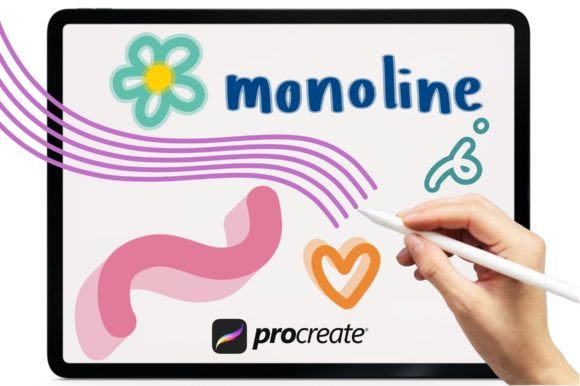
The primary value proposition of a curated brush bundle lies in its specificity. Generic brushes often lack the nuance required for intricate lettering styles. In contrast, a dedicated calligraphy set provides pre-configured settings that save hours of trial and error. Whether you are aiming for the sharp thins and thick downs of Copperplate or the consistent strokes of Monoline, having the right tool ready instantly allows you to focus on composition and creativity rather than technical troubleshooting.
Key Features That Enhance Creativity
A high-quality brush bundle typically includes a diverse range of tools tailored for specific artistic needs. Let us examine the core components found in comprehensive sets and how they contribute to the final artwork.
- Versatile Stroke Styles: A robust set usually includes around eight unique brushes. This variety ensures that you have the right instrument for every phase of your project. You might use a fine-tip brush for delicate serifs and a broader brush for bold, sweeping headlines.
- Specialized Script Support: Different calligraphy styles require different mechanical behaviors. Brushes designed for Modern Calligraphy often feature a slight bounce or texture, while those for Copperplate script prioritize smooth, continuous lines to maintain elegance.
- Shadow and Depth Effects: One of the standout features in advanced bundles is the inclusion of shadow brushes. These allow artists to add dimensionality to flat lettering without manually drawing each shadow line, significantly speeding up the workflow.
- Color Gradient Integration: Digital art excels where traditional media struggles: color manipulation. Many modern brush sets are optimized for use with gradient maps and alpha locks, enabling seamless transitions within a single stroke. This capability allows for eye-catching depth and vibrancy that can make social media graphics or logo designs pop.
Practical Applications for Creators and Businesses
Who benefits most from investing in a Procreate Calligraphy Brushset for iPad? The answer spans a wide demographic, from hobbyists to enterprise-level designers. Understanding where these tools fit into professional workflows can help you determine if they align with your current projects.
For Graphic Designers and Illustrators
Professional illustrators often face tight deadlines. The ability to instantly access a library of high-quality brushes means less time configuring settings and more time creating. For branding projects, custom lettering created with these brushes offers a unique identity that stock fonts cannot replicate. A designer can quickly iterate on logo concepts, testing different weights and styles using the monoline and shadow brushes included in the bundle.
For Social Media Content Creators
In the age of visual storytelling, hand-lettered quotes and headers perform exceptionally well on platforms like Instagram and Pinterest. Using an iPad with Apple Pencil and a specialized brush set allows creators to produce authentic, human-centric content. The instant digital download nature of these tools means you can start creating immediately after purchase, without waiting for shipping or physical supplies.
For Educators and Students
Art educators find digital calligraphy an excellent way to teach the fundamentals of stroke order and pressure control. Students can practice endlessly without wasting paper or ink. The undo function serves as a safety net, encouraging experimentation without the fear of ruining a piece. This lowers the barrier to entry for those intimidated by the permanence of traditional ink.
Evaluating Suitability: Is This Bundle Right for You?
While the Procreate Calligraphy Brushset for iPad offers numerous advantages, it is essential to approach any digital tool with realistic expectations. Not every brush set will suit every artist’s style. Here are some factors to consider before integrating these tools into your workflow.
- Learning Curve: Even with pre-set brushes, digital calligraphy requires practice. Understanding how pressure sensitivity interacts with your specific iPad model and Apple Pencil generation is crucial. Beginners should expect a period of adjustment where strokes may feel slippery compared to paper.
- Device Compatibility: Ensure your iPad supports the latest version of Procreate. Older models may experience lag with complex brush engines, particularly when using high-resolution canvases with multiple layers.
- Style Alignment: Review the specific styles included in the bundle. If the set focuses heavily on ornate Copperplate but your work leans towards minimalist sans-serif lettering, the utility of the package may be limited. Look for bundles that offer a mix of Monoline, script, and decorative options to ensure versatility.
Getting Started: Importing and Using Your Brushes
One of the most appealing aspects of digital assets is the immediacy of access. Once you have purchased your Procreate Calligraphy Brushset for iPad, the setup process is straightforward. Here is a practical guide to getting your tools ready for use.
First, locate the downloaded file on your device. It is typically a .brushset file. Tap on this file, and it should automatically open in Procreate. If it does not, you can import it manually by opening Procreate, navigating to the Brush Library, and selecting "Import" from the top right menu. Choose the file from your files app, and the entire collection will appear in your brush list.
Once imported, create a new canvas. Select the brush that best suits your initial sketch. For beginners, starting with a Monoline brush is recommended as it provides consistent width, helping you focus on letter structure before tackling pressure-sensitive variations. As you gain confidence, experiment with the Shadow brushes to add depth to your finalized letters. Remember to utilize layers; keep your sketch on one layer and your final ink on another. This non-destructive workflow allows for easy edits and refinements.
Conclusion: Elevating Your Digital Artistry
The Procreate Calligraphy Brushset for iPad represents more than just a collection of digital tools; it is an invitation to explore the intersection of tradition and technology. By providing instant access to specialized brushes for Copperplate, Modern Calligraphy, and Monoline styles, these bundles empower artists to produce professional-grade work with greater efficiency. Whether you are designing a brand identity, creating social media content, or simply enjoying the meditative process of lettering, the right digital tools can unlock new levels of creativity.
As you embark on your digital calligraphy journey, remember that the tool is only part of the equation. Practice, patience, and a willingness to experiment are equally important. With the right brush set in your toolkit, your digital canvas awaits, ready to transform your ideas into captivating visual masterpieces. Embrace the flexibility of digital art, and let your creativity flow without boundaries.