Mastering Clean Lines with the Monoline Procreate Brush Set
Digital illustration offers limitless freedom, but for many artists, achieving consistent, clean linework remains a persistent challenge. Whether you are designing logos, creating intricate mandalas, or sketching architectural concepts, the stability and uniformity of your lines define the professionalism of your final piece. This is where a specialized Monoline Procreate Brush becomes an indispensable tool in your digital arsenal. Unlike standard brushes that vary wildly in opacity and width based on erratic hand movements, monoline tools are engineered to provide steady, predictable strokes that maintain their integrity from start to finish.
The demand for precision in digital art has grown exponentially as more creators move toward vector-style aesthetics within raster-based programs. However, finding the right tool that balances ease of use with artistic flexibility can be difficult. Many default brushes require extensive tweaking to achieve a true monoline effect, often resulting in frustration and wasted time. A dedicated solution simplifies this process, allowing artists to focus on composition and creativity rather than fighting against their software settings.
Understanding the Need for Precision Tools
Artists often struggle with "jittery" lines when drawing freehand on an iPad. While streamlining features in Procreate help, they do not always produce the perfect geometric consistency required for technical illustrations or modern graphic design. The core goal for users seeking a Monoline Procreate Brush is usually efficiency and aesthetic consistency. They want lines that look intentional, smooth, and uniform without spending hours adjusting pressure curves or stabilizer settings.
This need is particularly acute for professionals working under tight deadlines. When you are creating assets for client presentations, social media graphics, or print-on-demand products, reliability is key. A brush set that guarantees uniform stroke weight allows for faster iteration. You can sketch, refine, and finalize your work with confidence, knowing that the foundational lines of your artwork will hold up under scrutiny. Furthermore, for beginners, these tools serve as an excellent training wheel, helping them understand spacing and form without being discouraged by shaky hand movements.
Exploring the Versatility of the Four-Brush Set
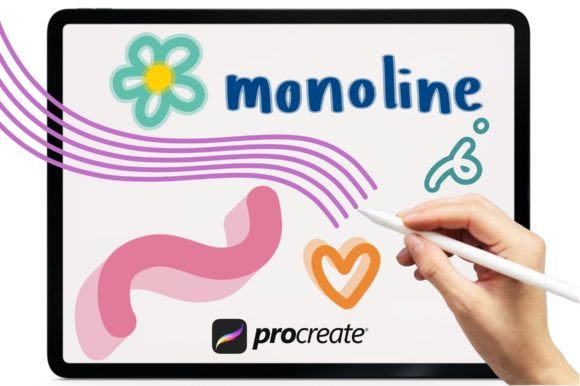
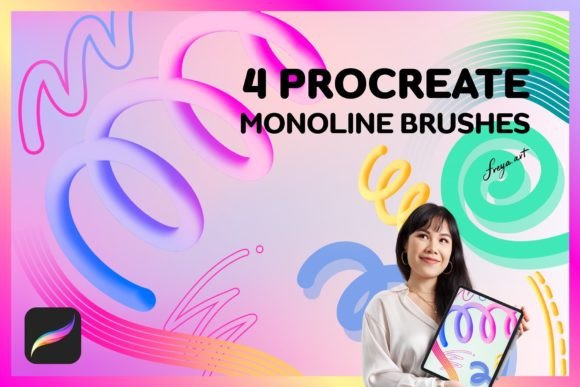
A comprehensive solution goes beyond a single tool. The Set of 4 Monoline Brushes for Procreate is designed to address various stages of the creative process, offering a holistic approach to line art. Each brush in this collection serves a distinct purpose, ensuring that you have the right instrument for every specific task.
- Round Multi Line Brush: This tool is ideal for creating complex patterns, hatching, or decorative borders. It allows for multiple parallel lines to be drawn simultaneously, saving significant time when filling spaces with texture or creating rhythmic visual elements.
- Round Outline Brush: The cornerstone of the set, this brush provides the classic, solid monoline stroke. It is perfect for defining shapes, creating bold typography, or outlining characters in comic styles. Its consistency ensures that your outlines remain crisp and professional.
- Shadow Brush: Depth is crucial in flat design. This specialized brush helps add dimension to your monoline art by creating soft, consistent shadow blocks. It eliminates the guesswork of manually shading, allowing you to pop elements forward or push them back with ease.
- Duo Color Brush: For artists who want to add immediate visual interest, this brush applies two colors in a single stroke. It is excellent for creating highlights, reflections, or stylized effects that would otherwise require multiple layers and meticulous masking.
In addition to these functional tools, the inclusion of a Bonus Paper Texture adds a tactile quality to digital works. Applying this texture can soften the sterile look of pure digital vectors, giving your illustrations a warm, organic feel that resonates well with audiences accustomed to traditional media.
Practical Applications and Creative Outcomes
The utility of a Monoline Procreate Brush extends across numerous disciplines. Graphic designers can utilize the Round Outline Brush for logo creation, ensuring that brand marks are scalable and clean. Illustrators might leverage the Shadow Brush to create depth in children’s book illustrations, making characters feel grounded without heavy rendering. Pattern designers will find the Round Multi Line Brush invaluable for generating seamless repeats and intricate textile designs.
Consider the workflow of a sticker designer. Using the Duo Color Brush, they can quickly add highlight effects to their characters, reducing the number of layers needed and keeping the file size manageable. Meanwhile, an architect or interior designer might use the basic monoline tool to sketch quick, clean floor plans or furniture concepts that communicate ideas clearly without unnecessary artistic flourish. The outcome is always a polished, professional look that enhances the perceived value of the work.
Technical Considerations for Optimal Performance
To fully benefit from these tools, it is essential to understand their technical requirements. These brushes are crafted specifically for the Procreate app for iPad. It is important to note that they do not work in other software like Adobe Photoshop, Clip Studio Paint, or desktop applications. This specificity ensures that the brushes leverage Procreate’s unique engine capabilities, such as its advanced pressure sensitivity and tilt recognition.
For the best experience, using an Apple Pencil is highly recommended. The brushes rely on the amount of pressure used when drawing to function correctly. While you can draw with your finger, the nuanced control offered by the Apple Pencil allows you to maximize the potential of the Shadow and Duo Color brushes. Pressure sensitivity enables subtle variations in opacity or width where intended, providing a natural drawing feel despite the monoline constraint.
Another practical advantage is the Instant Download model. Once you complete your purchase, you gain immediate access to the files. This means you can start integrating these tools into your current projects without waiting for shipping or dealing with physical media. Simply import the .brushset file into Procreate, and you are ready to create.
Tailoring Your Approach
Different users will approach the Monoline Procreate Brush set differently based on their skill level and goals. Beginners should start by mastering the Round Outline Brush, focusing on hand-eye coordination and learning how pressure affects the stroke. As confidence grows, they can experiment with the Shadow Brush to understand light and form.
Advanced users, on the other hand, may use the Multi Line and Duo Color brushes to speed up their workflow. They might combine these tools with layer blending modes to create complex visual effects that mimic screen printing or risograph styles. By understanding the specific strengths of each brush, artists can develop a personalized workflow that maximizes efficiency and artistic expression.
Ultimately, investing in a high-quality brush set is about removing barriers between your idea and its execution. The Set of 4 Monoline Brushes for Procreate offers a reliable, versatile foundation for any digital artist looking to elevate their line work. Whether you are refining your skills or streamlining a professional pipeline, these tools provide the precision and flexibility needed to create stunning, clean, and impactful digital art.