Mastering Realistic Textures with Procreate Faux Fur Brushes
Digital illustration has come a long way from flat vectors and solid color blocks. Today, the demand for tactile, hyper-realistic textures is higher than ever, particularly in character design, fashion illustration, and children’s book art. Among the most challenging textures to replicate digitally is fur. Whether you are designing a cuddly teddy bear texture for a nursery print or sketching intricate faux fur for jackets in a fashion portfolio, the right tools make all the difference. This is where specialized Procreate Faux Fur Brushes become indispensable assets in your digital toolkit.
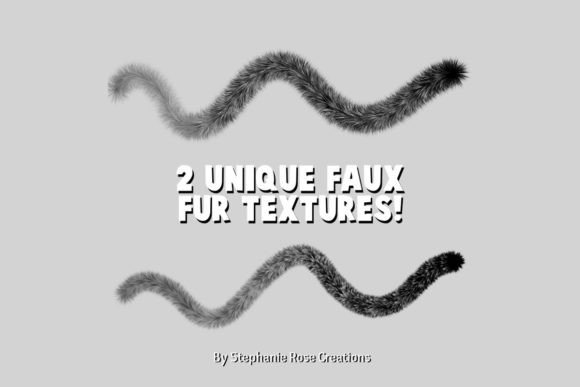
These brushes are not merely standard scatter tools; they are engineered to mimic the chaotic yet directional nature of hair strands. By including two distinct brush types, this set addresses the dual needs of base layering and detailed strand definition, allowing artists to achieve depth and realism without spending hours on manual stroke work.
The Challenge of Digital Fur
Creating convincing fur in Procreate using default brushes often results in a "plastic" or overly uniform look. Standard round brushes lack the irregularity found in natural fibers, while noise brushes can appear too static. The core issue lies in replicating three specific characteristics: directionality, variance in thickness, and translucency at the tips.
Procreate Faux Fur Brushes solve this by utilizing custom shape dynamics and pressure sensitivity settings. When you press lightly, the brush deposits fine, wispy hairs that mimic the undercoat or the soft edges of a garment. As you increase pressure, the strokes become denser and more defined, simulating the guard hairs that give fur its structure. This dynamic response allows for a natural workflow that feels intuitive rather than mechanical.
Why Two Brushes Are Better Than One
The inclusion of two specialized brushes in this pack is a deliberate design choice that mirrors traditional painting techniques. In traditional media, an artist might use a large, soft mop brush for the base tone and a fine liner brush for individual hairs. Trying to do both with a single digital tool often leads to compromise.
- The Base Builder: The first brush is designed for volume. It lays down the foundational mass of the fur, establishing light and shadow patterns quickly. This is crucial for blocking in shapes before getting lost in details.
- The Detail Definer: The second brush focuses on precision. It creates sharp, individual strands that break up the silhouette and add the necessary chaos that makes fur look alive. This is where the magic happens for high-resolution pieces.
By separating these functions, artists can work faster and maintain greater control over the final aesthetic. You are not fighting against a single brush trying to do everything; instead, you are orchestrating a layered process.
Applications in Character Design: The Teddy Bear Texture
One of the most popular uses for these tools is creating adorable, huggable characters. A teddy bear texture requires a specific softness that differs from wild animal fur. It needs to look plush, dense, and inviting. When illustrating children’s books or toy concepts, the emotional connection relies heavily on how "touchable" the character appears.
Using Procreate Faux Fur Brushes, you can build up layers of warm, muted tones to simulate the matted, cozy feel of vintage teddy bears. Start with the base builder to create rounded, soft forms around the eyes and paws. Then, use the detail definer to add stray hairs around the edges, breaking the perfect circle of the head to suggest fluffiness. The key here is less about sharp definition and more about soft transitions. These brushes allow you to blend colors directly within the stroke, creating that beloved worn-in look without needing complex blending modes.
Fashion Illustration: Rendering Faux Fur for Jackets
In the fashion industry, sustainability is driving a surge in faux fur popularity. Illustrators must be able to depict these materials accurately for clients and buyers. Unlike natural fur, faux fur for jackets often has a slightly more uniform sheen and can feature bold, unnatural colors. However, it still requires the same structural integrity to look realistic.
When drawing a coat collar or a cuff, the direction of the fur is critical. It must follow the form of the body underneath. The pressure-sensitive nature of these brushes allows you to sweep long, flowing strokes that wrap around the curve of a shoulder. You can layer vibrant colors—electric blues, deep purples, or neon greens—while maintaining the textural integrity of the fiber. The result is a garment that looks heavy, luxurious, and tangible, adding significant value to fashion portfolios and technical flats.
Integrating into Modern Workflows
Modern digital artists often work under tight deadlines. Efficiency is paramount. These brushes integrate seamlessly into existing Procreate workflows because they respect the app’s native gesture controls and layer structures. You can use them on standard pixel layers, but they truly shine when combined with clipping masks and alpha lock.
- Speed Painting: Block in your subject with solid colors, then use the base fur brush to quickly establish texture across the entire form.
- Refinement: Zoom in and use the detail brush to add highlights and shadows strand by strand where light hits the curves.
- Color Grading: Because the brushes have built-in opacity variation, you can easily glaze new colors over existing fur without losing the texture underneath.
This non-destructive approach means you can experiment with different color palettes for your teddy bear or jacket without starting from scratch. It encourages iteration and creativity, which are essential for professional growth.
Tips for Maximizing Realism
Even with the best tools, technique matters. To get the most out of your Procreate Faux Fur Brushes, consider the lighting environment of your piece. Fur catches light differently than skin or metal. It has a subsurface scattering effect where light penetrates the tips of the hairs.
Use lighter, warmer tones for the tips of the fur where the light hits, and deeper, cooler tones for the roots. Avoid using pure black for shadows; instead, use dark browns or blues to keep the fur looking rich and organic. Additionally, vary your stroke length. Real fur is never perfectly uniform. Some areas will be clumped, others sparse. Let the brush do the work, but guide it with intentional, varied movements.
Another consideration is the background. A busy background can compete with detailed fur textures. If your subject is a highly detailed faux fur jacket, consider simplifying the background to let the texture breathe. Conversely, if you are illustrating a teddy bear in a cluttered nursery, ensure the fur edges are distinct enough to separate the character from the environment.
Choosing the Right Tool for Your Project
Before adopting any new brush set, artists should evaluate their specific needs. Are you primarily doing quick sketches, or high-fidelity renderings? While Procreate Faux Fur Brushes are versatile, they are optimized for mid-to-high detail work. For extremely stylized, cartoonish art, you might find them too realistic, requiring you to reduce opacity significantly. However, for semi-realism and realism, they are unmatched in their category.
The value proposition lies in the time saved. What might take an hour of manual stippling and line work can be achieved in minutes with these specialized tools. This efficiency allows artists to take on more projects or spend more time on composition and storytelling rather than getting bogged down in repetitive texturing tasks.
Ultimately, the goal of digital art is to evoke emotion. A well-rendered teddy bear can trigger nostalgia, while a luxurious faux fur jacket can convey status and style. By mastering these two essential brushes, you equip yourself with the ability to translate tactile sensations into visual experiences, bridging the gap between the screen and the viewer’s imagination. Whether you are a seasoned illustrator or a hobbyist looking to elevate your character designs, incorporating dedicated fur tools is a step toward professional-grade results.