Streamlining Digital Illustration Workflows with Rainbow Shapes Procreate Brushes
In the evolving landscape of digital art and design, efficiency often dictates the quality of output as much as raw talent does. For professionals ranging from graphic designers to social media managers, the ability to produce visually engaging content quickly is a critical asset. This is where specialized tools like Rainbow Shapes Procreate Brushes become integral to a streamlined creative process. Unlike standard brush sets that merely replicate traditional media, this specific collection introduces an element of automated variability that can significantly reduce manual adjustment time while adding dynamic visual interest.
Understanding how to integrate these brushes into your existing workflow requires more than just downloading a file. It involves recognizing where they fit within the broader scope of project planning, execution, and final delivery. Whether you are creating educational materials for students, designing marketing assets for a small business, or developing concept art for a client, knowing how to leverage the unique properties of these brushes can enhance both your productivity and the aesthetic appeal of your work.
Understanding the Tool and Its Compatibility
Before integrating any new asset into your toolkit, it is essential to understand its technical constraints and capabilities. The Rainbow Shapes Procreate Brushes set is explicitly designed for use within the Procreate ecosystem on iPad. It is crucial to note that this brush set will not work with other programs such as Adobe Photoshop, Clip Studio Paint, or Affinity Designer. This limitation is not a drawback but rather a specialization that allows the brushes to utilize Procreate’s specific rendering engine and gesture controls.
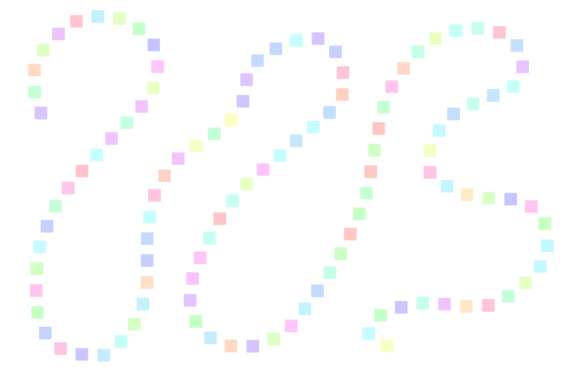
The set contains nine distinct shape brushes. What sets them apart from conventional stamps or shapes is their dynamic color behavior. Each stroke automatically changes color, eliminating the need for manual hue shifts between every application. This feature is particularly valuable for creators who need to maintain a high pace without sacrificing visual diversity. Furthermore, the design philosophy behind these brushes emphasizes accessibility; you do not need a pressure-sensitive pen for this set to work well. This makes them an excellent choice for quick ideation sessions, touch-based sketching, or for users who prefer drawing with their fingers for a more organic, immediate feel.
Pre-Production and Ideation Phase
In the early stages of a project, speed and flexibility are paramount. During brainstorming or mood boarding, the goal is to generate volume and variety rather than perfection. Here, Rainbow Shapes Procreate Brushes serve as an effective tool for rapid visualization. Because the brushes change color with each stroke, they allow designers to quickly explore different color palettes and compositional balances without interrupting their flow to adjust color wheels.
For educators and instructional designers, this phase might involve creating rough layouts for worksheets or presentation slides. The ability to draw bright or pastel shapes instantly helps in mapping out where visual elements should sit relative to text. By choosing a bright color initially, you can ensure that placeholder shapes stand out against the background, making it easier to assess spatial relationships. Once the layout is approved, these shapes can be refined or replaced, but their initial role in structuring the visual hierarchy is invaluable.
Integration into Active Design Workflows
Once a project moves into the production phase, the focus shifts to consistency and refinement. Integrating these brushes requires a strategic approach to layer management and color selection. Since the brushes automate color variation, the user’s primary control lies in the base color chosen before drawing. Selecting a cohesive base tone—such as a muted pastel or a vibrant neon—sets the range for the automatic variations. This ensures that while the colors change, they remain harmonious with the overall design scheme.
Consider a scenario where a social media manager is creating a series of Instagram stories. Consistency across posts is key to brand recognition. By using the same base color family for the Rainbow Shapes Procreate Brushes, the manager can create varied yet cohesive backgrounds or decorative elements. The brushes interact seamlessly with Procreate’s blending modes. Placing a layer of these shapes over a photo and setting the blend mode to "Overlay" or "Soft Light" can add texture and depth without obscuring the underlying image. This interaction with other layers and assets demonstrates how the brushes function not in isolation, but as part of a complex digital stack.
Practical Implementation Tips
- Color Selection Strategy: Always choose your base color deliberately. A bright base will yield high-contrast, energetic variations, while a pastel base will result in subtle, soft transitions. Test a few strokes on a separate layer before committing to the main canvas.
- Layer Organization: Keep brush strokes on separate layers from your main subject matter. This allows for non-destructive editing. If the automatic color variation produces a hue that clashes with your composition, you can easily adjust the layer’s hue/saturation settings or erase specific strokes without affecting the rest of the artwork.
- Scale and Density: Vary the size of the brush to create depth. Larger shapes can serve as background elements, while smaller, denser clusters can add texture to foreground objects. This mimics natural patterns and prevents the design from looking flat.
Enhancing Educational and Marketing Materials
For professionals in education and marketing, visual engagement is directly linked to retention and conversion. The Rainbow Shapes Procreate Brushes offer a quick way to add playful, eye-catching elements to otherwise static content. In educational apps or digital textbooks, these shapes can be used to highlight key information, create bullet points, or design interactive elements that appeal to younger audiences. The automatic color change keeps the visual experience fresh, preventing monotony in long-form content.
Similarly, marketers can use these brushes to create unique dividers, borders, or background textures for email newsletters and blog headers. Because the brushes are vector-like in their cleanliness but organic in their variation, they bridge the gap between rigid geometric design and hand-drawn charm. This hybrid aesthetic is currently trending in digital marketing, as it conveys authenticity and approachability. By incorporating these shapes, brands can differentiate their visual identity from competitors who rely solely on stock photography or generic templates.
Quality Control and Long-Term Use
Maintaining quality over time requires consistent evaluation of how tools perform within your workflow. While the Rainbow Shapes Procreate Brushes are designed for ease of use, periodic review of your output is necessary. Ask yourself whether the automatic color variations are enhancing the message or distracting from it. In professional contexts, subtlety is often more effective than overt decoration. If the colors become too chaotic, consider reducing the opacity of the brush layer or using a monochromatic base color to tame the variation.
Long-term use also involves organizing your digital assets. Ensure that the brush set is backed up and stored in a dedicated folder within your Procreate library. Labeling layers clearly when using these brushes will save time during revisions. As projects grow in complexity, the ability to quickly locate and modify specific elements becomes crucial for meeting deadlines and maintaining client satisfaction.
Conclusion: A Strategic Asset for Digital Creators
The Rainbow Shapes Procreate Brushes represent more than just a collection of digital stamps; they are a workflow enhancement tool that addresses the need for speed, variety, and visual appeal. By understanding their compatibility, leveraging their automatic color features, and integrating them thoughtfully into your design process, you can elevate the quality of your output. Whether you are an entrepreneur designing your own branding, an educator creating engaging lessons, or a freelancer delivering client work, these brushes offer a practical solution to common creative challenges. Embrace the tool, experiment with its parameters, and let it streamline your path from concept to completion.