Creating Effortless Color with the Rainbow Wave Procreate Brush Set
If you have ever tried to paint a perfect rainbow in digital art, you know the struggle. It involves meticulous layering, precise color selection, and often hours of tweaking opacity settings just to get the blend right. For many illustrators and designers, this process is less about creativity and more about tedious technical execution. This is where the Rainbow Wave Procreate Brush Set changes the game entirely. Originally discovered by accident while attempting to create a specific streaky brush, this pack has evolved into an essential tool for anyone who wants to inject vibrant, retro-inspired energy into their work without the headache.
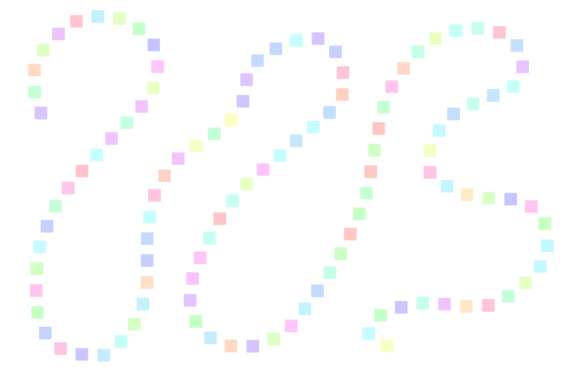
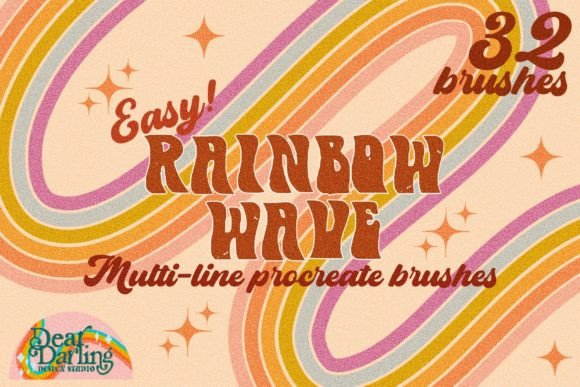
The beauty of this tool lies in its simplicity and versatility. It is not just a single stamp; it is a comprehensive system designed to handle various aesthetic needs. Whether you are designing a logo for a boutique coffee shop, creating social media graphics for a lifestyle brand, or illustrating a children’s book, these brushes offer a shortcut to professional-looking results. The set includes five distinct multi-line options, ranging from two lines up to six lines. This variety allows you to choose the density that fits your composition, whether you need a subtle hint of color or a bold, dominant graphic element.
Beyond the Basic Stripe: Understanding the Textures
What sets this brush pack apart from standard shape tools is the depth of texture included. A flat, digital rainbow can often look sterile or outdated in a way that feels unintentional. To combat this, each of the five line configurations comes in six different formats. You have the regular format for clean, crisp lines, but the real magic happens with the textured variants. There is a format with thicker gaps for a more spaced-out, airy feel, which works wonderfully for background elements that shouldn’t overpower the main subject.
For those leaning into specific artistic movements, the trippy texture option is invaluable. It adds a psychedelic, fluid quality that mimics liquid ink or oil paints mixing on canvas. This is particularly useful for album covers, poster designs, or any project aiming for a 1970s revival aesthetic. Similarly, the noise texture adds a grainy, vintage film look that appeals to modern minimalists who want warmth without clutter. The cracked texture offers a distressed, weathered appearance, perfect for grunge-style edits or rugged branding materials. Finally, the rough edge texture softens the boundaries, making the rainbow feel hand-painted and organic rather than digitally generated.
In total, you are working with thirty specialized multi-line rainbow brushes. But the creator didn’t stop there. Recognizing the value of the original accident that started it all, the pack includes two bonus brushes featuring the streaky painter’s texture. These are less structured and more expressive, ideal for adding spontaneous bursts of color or creating abstract backgrounds that feel dynamic and alive.
Real-World Applications for Creators and Businesses
The utility of the Rainbow Wave Procreate Brush Set extends far beyond casual doodling. For small business owners and marketers, visual consistency and speed are crucial. Imagine you are launching a new product line and need a series of Instagram stories that stand out in a crowded feed. Using the three-line brush with the trippy texture, you can create eye-catching headers in seconds. The consistent spacing ensures that your text remains legible while the vibrant colors draw the viewer’s eye. This efficiency allows solopreneurs to maintain a high output of quality content without needing advanced graphic design skills.
Educators and content creators also benefit significantly from these tools. When designing worksheets, presentation slides, or educational videos, visual aids help retain attention. A teacher creating materials for a unit on light or color theory can use the four-line regular brush to demonstrate spectral concepts clearly. The clean lines ensure that the educational message isn’t lost in visual noise. Similarly, bloggers can use the six-line brush with the noise texture to create unique dividers between sections of their articles, adding a personalized touch that generic stock photos cannot match.
Freelance illustrators will find the bonus streaky brushes particularly liberating. Often, clients request "organic" or "hand-drawn" elements to soften the digital feel of a project. Instead of spending hours manually adjusting brush dynamics, you can apply these streaky textures to create immediate depth. They are perfect for adding highlights to character hair, creating atmospheric effects in landscape illustrations, or designing unique patterns for textile prints. The ability to toggle between structured waves and freeform streaks gives artists the flexibility to adapt to diverse client briefs quickly.
Choosing the Right Brush for Your Project
Before diving in, it is helpful to consider the mood and medium of your project. If you are aiming for a clean, modern corporate look, the regular format with two or three lines is likely your best bet. It provides structure and clarity. However, if you are working on a creative campaign for a music festival or an art exhibition, the cracked or trippy textures will resonate more with the target audience. The key is to match the texture to the emotion you want to evoke. Smooth lines suggest order and calm, while rough or noisy textures suggest energy, nostalgia, or rebellion.
Another consideration is scale. The six-line brush is powerful but can become muddy if used too small. It shines in large-format designs like posters or banner ads where the individual lines can be appreciated. Conversely, the two-line brush is incredibly versatile for smaller applications, such as icons, favicons, or intricate details within a larger illustration. Testing these brushes at different sizes before finalizing your design will save you time during the revision process.
It is also worth noting how these brushes interact with other Procreate features. Because they are multi-line, they respond beautifully to pressure sensitivity if configured correctly, though they are primarily designed for consistent strokes. Experimenting with blend modes can yield surprising results. For instance, using the rainbow wave on a layer set to "Overlay" or "Soft Light" can tint underlying images with a subtle iridescent glow, adding a dreamlike quality to photography or complex digital paintings.
Integrating Rainbow Waves into Your Workflow
To get the most out of the Rainbow Wave Procreate Brush Set, think of it as a foundational element rather than an afterthought. Start your design process by deciding where color needs to guide the viewer’s eye. Use the brushes to create pathways or frames that lead attention to your central message. For example, in a circular logo design, using the brushes to create perfect rings of color inside a circle can create a hypnotic, focal point that anchors the entire composition.
Furthermore, don’t be afraid to combine the different textures. Layering a regular rainbow wave with a semi-transparent streaky brush on top can create a complex, custom look that feels unique to your brand. This layering technique adds dimension and prevents the design from looking flat. By understanding the specific strengths of each of the thirty brushes plus the two bonuses, you can build a library of reusable assets that streamline your future projects.
Ultimately, this brush set is about removing friction from the creative process. It allows you to focus on composition, storytelling, and concept rather than getting bogged down in the mechanics of drawing perfect curves. Whether you are a seasoned professional looking to speed up your workflow or a hobbyist wanting to explore new styles, the Rainbow Wave Procreate Brush Set offers a practical, joyful way to bring more color into your digital world.