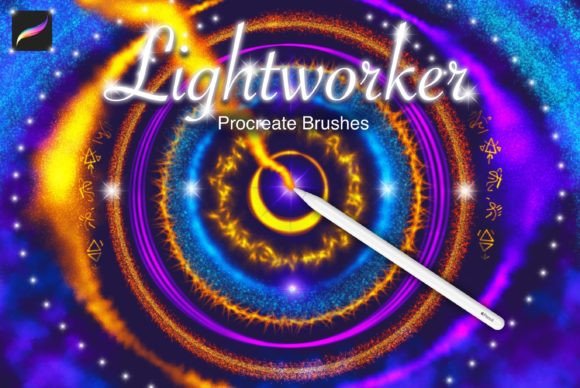
Lightworker Procreate Sparkle: A Practical Review of Magical Light Effects for Digital Artists
Digital illustration has evolved far beyond flat colors and basic shading. Today, viewers expect depth, atmosphere, and a sense of movement in artwork. This is where specialized brush sets come into play, offering shortcuts to complex visual effects that would otherwise take hours to render manually. Lightworker Procreate Sparkle is one such resource, designed specifically for artists who want to inject energy and mystique into their compositions without getting bogged down in technical layering processes.
This set focuses on light-based phenomena, providing twenty-seven distinct brushes that cover a wide spectrum of luminous effects. From the soft glow of fireflies to the harsh crackle of electricity, these tools aim to streamline the workflow for fantasy, sci-fi, and portrait artists. However, before adding any new asset to your digital toolkit, it is essential to understand not just what it does, but how it fits into your existing workflow and whether it offers advantages over creating these effects from scratch or using alternative methods.
Understanding the Scope of Lightworker Procreate Sparkle
The core value proposition of Lightworker Procreate Sparkle lies in its variety and specificity. Rather than offering a single "glitter" brush that looks the same every time, this collection breaks down light into its constituent atmospheric elements. The set includes twenty-seven brushes categorized by the type of illumination they simulate. This includes flame effects for warmth and danger, neon lines for cyberpunk aesthetics, and delicate star fields for cosmic backgrounds.
What makes this set distinct is its attention to the physics of light, even within a stylized context. For instance, the comet brushes are designed with trailing tails that suggest motion, while the electricity brushes offer jagged, unpredictable paths that mimic natural discharge. The inclusion of light flares allows artists to add camera-like artifacts, which can ground a fantastical image in a sense of photographic realism. This blend of magical and mechanical light sources makes the set versatile across different genres.
A critical aspect of using these brushes effectively is understanding their interaction with background values. The developer notes a top tip: use these brushes on a dark background for ultimate sparkly-ness. This is not merely a suggestion but a technical necessity for additive blending modes often used in light effects. On a white or light-colored canvas, many of these brushes may appear faint or washed out. On a dark background, however, the transparency and glow settings interact with the underlying pixels to create a convincing emission of light.
Comparing Specialized Brushes vs. Manual Techniques
When evaluating Lightworker Procreate Sparkle, it is helpful to compare it against the traditional method of creating light effects manually. Many experienced digital painters prefer to build glows using soft airbrushes, layer masks, and adjustment layers like Gaussian Blur. This manual approach offers total control over the shape, intensity, and color gradient of the light.
The primary tradeoff here is time versus control. Creating a realistic nebula or a complex lightning strike from scratch can take thirty minutes to an hour, requiring a deep understanding of lighting theory. In contrast, using a dedicated brush from this set can achieve a similar base effect in seconds. For artists working on tight deadlines or those who need to iterate quickly on concepts, the efficiency gain is significant. However, the manual approach allows for more unique, custom results that do not risk looking like preset assets.
Another comparison point is the use of stock overlays or textures. Some artists import PNG images of sparks or stars and place them over their work. While this can be effective, it often lacks integration with the painting’s perspective and lighting direction. Brushes like those in Lightworker Procreate Sparkle allow for dynamic application. You can paint the light directly onto the subject, following the contours of the face or the curve of a sword, ensuring the effect feels part of the scene rather than pasted on top.
Ideal Use Cases and Artistic Applications
To determine if this tool is right for you, consider the types of projects you frequently undertake. Lightworker Procreate Sparkle is particularly well-suited for specific genres and artistic goals.
- Fantasy Illustration: The magic spells, enchanted forests, and mystical creatures common in fantasy art benefit greatly from the glitter, star, and firefly brushes. These elements help convey magical energy without needing to illustrate complex spell structures.
- Sci-Fi and Cyberpunk: The neon and electricity brushes are invaluable for creating futuristic cityscapes, holographic interfaces, and tech-enhanced characters. The ability to quickly lay down glowing lines helps establish the high-contrast aesthetic typical of these genres.
- Portrait Enhancement: Subtle light flares and soft glows can be used to highlight facial features or add a dreamy quality to character portraits. This is less about obvious special effects and more about enhancing mood and focus.
- Background Atmosphere: The space and comet brushes are excellent for filling empty negative space in compositions, adding depth and interest to backgrounds that might otherwise feel flat.
It is important to note that these brushes are most effective when used as accents. Overusing them can lead to a cluttered composition where the viewer’s eye has no place to rest. The best practice is to use them sparingly to guide attention or enhance the narrative of the piece.
Limitations and Considerations for Buyers
While Lightworker Procreate Sparkle offers considerable utility, it is not a universal solution for all lighting needs. One limitation is the reliance on dark backgrounds. If your primary work involves bright, high-key illustrations, such as children’s book art or daytime scenes, you may find these brushes less useful. They require careful adjustment of opacity and blending modes to work on lighter surfaces, which can negate some of the time-saving benefits.
Additionally, artists who prioritize a highly realistic, painterly style may find the preset nature of these brushes restrictive. The shapes of the stars, comets, and sparks are fixed. While you can rotate and resize them, you cannot fundamentally change their structure without editing the brush source. For hyper-realistic work, custom-painted highlights often yield more organic results.
There is also the factor of skill development. Relying too heavily on preset effects can hinder an artist’s understanding of how light actually behaves. It is advisable for beginners to use these tools as learning aids—studying how the brushes construct light—rather than as crutches. Eventually, the goal should be to integrate these shortcuts with a solid foundation in lighting theory.
Making the Decision: Is This Set Right for You?
Choosing whether to invest in Lightworker Procreate Sparkle depends on your current workflow, artistic style, and budget. If you frequently create artwork that involves magical, cosmic, or technological themes, this set can significantly reduce your rendering time. The variety of twenty-seven brushes ensures that you have options for different types of light, preventing your work from looking repetitive.
However, if you primarily work in realistic portraiture, landscape painting, or minimalistic design, you may find limited application for these specific effects. In such cases, a general-purpose texture pack or a set of standard blending brushes might offer better value. Similarly, if you enjoy the process of building effects from scratch and have the time to do so, the manual approach may provide greater satisfaction and uniqueness.
Ultimately, Lightworker Procreate Sparkle is a specialized tool designed to solve a specific problem: the difficulty of painting convincing light effects quickly. It excels in its niche, offering a fun and addictive way to add sparkle and drama to digital art. By understanding its strengths and limitations, you can make an informed decision about whether it aligns with your creative goals. For those who decide to use it, remember the key advice: let the darkness of your background amplify the light, and use these effects with intention to enhance, not overwhelm, your artistic vision.