Mastering Texture: A Practical Guide to the Procreate Fur Brush Set for Digital Artists
Digital illustration has evolved significantly, moving beyond flat vectors and solid colors into realms of rich texture and tactile realism. For artists working within the iPad ecosystem, achieving organic textures like fur, hair, or soft fabric can be one of the most challenging aspects of the workflow. This is where specialized tools like the Procreate Fur Brush set become essential assets rather than mere novelties. Understanding how these specific brushes function, their limitations, and their ideal use cases is critical for any illustrator looking to elevate their character design or wildlife art.
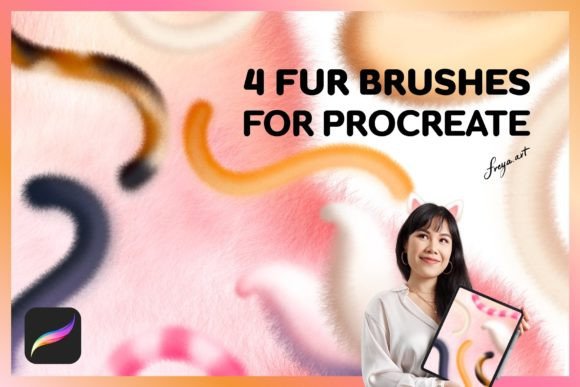
The market for digital brushes is saturated, making it difficult to distinguish between high-quality tools and redundant duplicates. A typical high-quality set, such as the one containing a Fluff So Soft Brush, a Fluff Monoline Brush, a Fluff Lettering Brush, and a dedicated Fur Brush, offers a diversified approach to texture. Instead of relying on a single tool for every hairy surface, this variety allows for nuanced control over different types of fibers. However, before integrating these tools into your pipeline, it is vital to understand the technical requirements and the specific artistic problems they solve.
Understanding the Mechanics of Digital Fur Rendering
Unlike standard round brushes that lay down uniform pigment, a Procreate Fur Brush relies heavily on the pressure sensitivity and tilt capabilities of the Apple Pencil. These brushes are engineered to react dynamically to the speed and force of your stroke. When you press lightly, the brush may produce fine, wispy strands; pressing harder creates denser, more opaque clumps of fur. This mimicry of real-world physics is what separates a premium brush set from basic textured stamps.
The inclusion of distinct brush types within a single set addresses the complexity of organic surfaces. For instance, the Fluff So Soft Brush is typically designed for blending and creating underlying volume. It acts less like individual hairs and more like the soft undercoat of an animal or the fuzzy texture of a peach. In contrast, the dedicated Fur Brush is likely optimized for longer, more defined strands that sit on top of the base layer, providing directionality and shine. Understanding this hierarchy—base volume versus surface detail—is key to using the set effectively.
Comparing Specialized Brushes to General Alternatives
Many artists begin their journey by attempting to create fur using standard hard-round brushes or generic textured tools found in default libraries. While this approach is viable for stylized or low-fidelity work, it often results in a "stamped" or repetitive look. The primary advantage of a dedicated Procreate Fur Brush is its algorithmic variation. These brushes introduce randomization in strand length, opacity, and spacing, which prevents the unnatural patterns that plague manual texturing.
When evaluating alternatives, consider the trade-off between control and speed. Customizing a standard brush to mimic fur requires deep knowledge of Procreate’s brush studio, including adjustments to grain, shape dynamics, and rendering properties. For professionals who bill by the hour, purchasing a pre-configured set is an investment in efficiency. However, for hobbyists interested in the technical side of digital art, building your own fur brushes can be a valuable learning exercise. The decision ultimately depends on whether your priority is immediate workflow optimization or long-term technical mastery.
The Role of Monoline and Lettering Variants
It may seem counterintuitive to include a Fluff Monoline Brush or a Fluff Lettering Brush in a set focused on organic texture. However, these tools serve a specific niche in modern illustration styles, particularly in children’s book art and whimsical character design. The monoline variant provides consistent width with textured edges, allowing for clean outlines that still feel hand-drawn and soft. This is crucial for maintaining readability in complex illustrations while keeping the aesthetic cohesive.
Similarly, the lettering brush enables artists to integrate text directly into the artwork without breaking the visual style. Imagine a poster featuring a fluffy monster; using a standard sans-serif font would clash with the organic feel of the character. A fluff-based lettering brush ensures that the typography shares the same tactile qualities as the illustration, creating a unified composition. This versatility makes the set more than just a texturing tool; it becomes a comprehensive style kit.
Technical Constraints and Compatibility Considerations
Before purchasing any digital asset, it is imperative to verify compatibility. Procreate brushes are made exclusively for the Procreate app on iPad. They do not work in Adobe Photoshop, Clip Studio Paint, or other desktop-based software. This limitation is due to the proprietary file format (.brushset) used by Procreate. If your workflow involves moving files between iPad and desktop applications, you will need to rasterize your layers or recreate the effects using native tools in the other software.
Furthermore, the performance of these brushes is intrinsically linked to hardware. The description notes that the brushes work best when used with Apple Pencil because they rely on pressure data. While you can use them with a finger or a third-party stylus, you will lose the dynamic range that defines their quality. Without pressure sensitivity, the fur strands will appear uniform and lifeless, negating the primary benefit of the tool. Artists using older iPad models should also ensure their devices support the latest version of Procreate to avoid latency issues during complex stroke rendering.
Evaluating the Value of Instant Download Assets
The convenience of an instant download cannot be overstated in a professional context. Unlike physical art supplies that require shipping time, digital brushes are available immediately after purchase. This allows for rapid iteration and experimentation. If you are working on a deadline and realize your current toolkit lacks adequate texturing options, acquiring a specialized set can resolve the bottleneck within minutes.
However, the ease of acquisition often leads to "brush hoarding," where artists accumulate hundreds of unused tools. To avoid this, approach the purchase with a specific project in mind. Ask yourself if your current work requires the specific type of softness or directional flow these brushes offer. The inclusion of a bonus Paper Texture adds further value by allowing you to composite your digital work onto a traditional background, bridging the gap between digital precision and analog warmth. This texture can be used as a top overlay layer with blend modes like Multiply or Overlay to unify the piece.
Decision Factors: Is This Set Right for You?
Choosing the right tools is a subjective process influenced by your artistic style and technical needs. The Procreate Fur Brush set is ideally suited for artists who focus on character design, creature concept art, or illustrative styles that prioritize softness and tactility. If your work leans towards hard-surface modeling, architectural visualization, or flat graphic design, these brushes may see limited use.
Consider the learning curve as well. While the brushes are pre-configured, mastering the pressure dynamics required to make them look natural takes practice. Beginners may find themselves overusing the effect, resulting in overly busy compositions. Experienced artists, however, will appreciate the subtle control these tools offer for adding final touches that bring a drawing to life. The key is integration; these brushes should complement your existing technique, not replace fundamental drawing skills.
In conclusion, the decision to invest in a specialized brush set should be based on a clear understanding of your workflow gaps. If you struggle with rendering organic textures efficiently, or if you seek to unify your line work and lettering with a soft, tactile aesthetic, this set offers a robust solution. Just remember to respect the technical boundaries of the platform and leverage the pressure sensitivity of your Apple Pencil to unlock the full potential of each stroke. By combining these tools with strong foundational skills, you can achieve a level of depth and realism that elevates your digital art above the standard.