Procreate Daffodils Brushes X 8: A Spring Guide
Digital illustration often faces a common hurdle: the tension between artistic freedom and technical efficiency. For creators working in Procreate, finding tools that bridge this gap can transform a tedious workflow into a fluid creative experience. The Procreate Daffodils Brushes X 8 set offers a specialized solution for artists who want to incorporate botanical elements without sacrificing time or quality. This digital asset is not merely a collection of static images; it is a functional toolkit designed to integrate seamlessly into your existing artistic process.
Understanding the value of specialized brush sets requires looking beyond the aesthetic appeal. While the visual outcome is important, the practical utility of these tools determines their long-term worth in a professional or hobbyist’s library. This article explores how this specific daffodil collection can enhance your digital artwork, streamline your production timeline, and offer new avenues for creative expression.
Efficiency Through Specialized Stamps
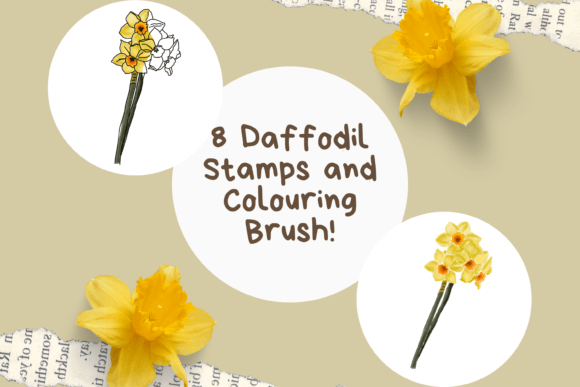
One of the most significant advantages of using the Procreate Daffodils Brushes X 8 is the time saved during the initial sketching and composition phases. The file includes 18 detailed Daffodil stamps, which serve as foundational elements for your compositions. Instead of drawing each petal and stem from scratch, you can place these pre-designed elements onto your canvas. This approach is particularly beneficial for commercial illustrators, greeting card designers, and surface pattern creators who often work under tight deadlines.
Consider a scenario where you are designing a spring-themed invitation suite. Drawing realistic daffodils repeatedly can lead to inconsistency and fatigue. With these stamps, you maintain a uniform style across all designs. You can rotate, resize, and reposition the flowers to create varied arrangements quickly. This method allows you to focus more on the overall composition and color harmony rather than getting bogged down in repetitive line work.
The Versatility of Buildable Coloring
A static stamp is useful, but a dynamic tool is invaluable. The standout feature of this set is the inclusion of a lovely colouring brush that is both buildable and blendable. This characteristic addresses a common limitation of stamp-based assets: the lack of organic texture. Standard stamps often look flat or digitally perfect, which can clash with hand-drawn elements in a piece.
The buildable nature of the coloring brush means you can layer colors gradually. Start with a light wash to establish the base tone of the petals, then build up saturation in the shadows. Because the brush is blendable, you can soften edges and create smooth gradients that mimic traditional watercolor or marker techniques. This flexibility allows you to adapt the daffodils to various artistic styles, from loose and impressionistic to detailed and realistic. It ensures that the floral elements feel integrated into the artwork rather than pasted on top.
Layer Management and Creative Control
Professional digital art relies heavily on non-destructive editing practices. The Procreate Daffodils Brushes X 8 supports this workflow by allowing you to keep the stamp outline or remove it when using layers. This feature provides critical control over the final look of your illustration.
If you prefer a clean, modern aesthetic, you might choose to remove the outline entirely, relying solely on color and shape to define the flower. Conversely, if your style leans toward illustrative or sketch-like qualities, keeping the outline adds definition and structure. By separating these elements onto different layers, you can adjust the opacity, blending mode, or color of the outline independently from the fill. This level of granularity is essential for refining details without having to redraw entire sections.
Technical Requirements and Installation
Before purchasing, it is crucial to understand the technical constraints of this digital product. This file will only work within the Procreate App on iPad. It is not compatible with Photoshop, Procreate Pocket, or desktop illustration software. Ensuring you have the correct hardware and software is the first step to a smooth experience.
The installation process involves a few specific steps that may be unfamiliar to some users. Since this is an instant download, digital purchase, you will receive a compressed file. To access the brushes, you need a platform to download the files to, such as iCloud, and a program capable of unzipping the files, like iZip. Once you have extracted the contents, the files are ready to be imported into Procreate.
The import process is straightforward. The package is structured as a Procreate file that will import automatically into the app once you select the option. It will appear within a named folder in your brush library, keeping your workspace organized. This organization is vital for maintaining a efficient workflow, allowing you to locate your daffodil tools quickly among other assets.
Who Benefits Most From This Tool?
While any digital artist can enjoy these brushes, certain groups will find them particularly advantageous. Surface pattern designers can use the stamps to create seamless repeats for textiles or wallpaper. The consistency of the stamps ensures that patterns remain cohesive. Educators and bloggers creating visual content for spring-related topics can produce high-quality illustrations rapidly, enhancing their articles or lesson plans without needing advanced drawing skills.
Small business owners who handle their own marketing materials can also benefit. Creating unique social media graphics or product labels with custom floral elements adds a professional touch that stock photos often lack. The ability to customize the color palette means these daffodils can align perfectly with brand guidelines.
Limitations and Considerations
It is important to approach this tool with realistic expectations. These brushes are specialized for daffodils. If your project requires a wide variety of flora, you will need to supplement this set with other botanical brushes. Additionally, while the stamps provide a strong foundation, they are not a substitute for understanding basic botanical structure. Using them effectively still requires an eye for composition and lighting.
Furthermore, the reliance on third-party apps for unzipping files may be a minor inconvenience for users accustomed to direct imports. However, this is a standard procedure for many high-quality digital brush sets due to file size and format requirements. Taking the time to set up your file management system correctly will pay off in the long run.
Integrating Into Your Creative Workflow
To get the most out of the Procreate Daffodils Brushes X 8, consider integrating them into a broader workflow. Start by sketching your composition loosely. Use the stamps to place the main floral elements, experimenting with rotation and scale to create natural variation. Then, switch to the buildable coloring brush to add depth and dimension. Use separate layers for outlines and colors to maintain flexibility.
Experiment with blending modes. Try setting the outline layer to "Multiply" to allow it to interact naturally with the colors beneath. Adjust the opacity of the coloring brush to create subtle transitions. By combining these techniques, you can achieve results that look hand-painted and unique, despite using pre-made assets.
In conclusion, the Procreate Daffodils Brushes X 8 represents a thoughtful addition to any digital artist’s toolkit. It balances efficiency with artistic control, offering a practical solution for incorporating beautiful botanical elements into your work. Whether you are a professional designer or a passionate hobbyist, these tools can help you create stunning spring-themed artwork with greater ease and confidence.