Unlocking Sparkle: A Practical Guide to the Glitter Brush Set for Procreate
Digital illustration has evolved from flat, static images into dynamic, textured experiences. Among the most sought-after effects is the illusion of shimmer and light reflection, a technique that can elevate a simple sketch into a captivating piece of art. This is where a specialized Glitter Brush Set for Procreate becomes an essential tool in your digital arsenal. However, simply downloading a pack of brushes does not guarantee professional results. Many artists, from enthusiastic beginners to seasoned freelancers, stumble over common pitfalls when integrating these tools into their workflow. Understanding how to properly utilize these assets can save you hours of frustration and significantly improve the quality of your final output.
The Misconception of "Plug-and-Play" Perfection
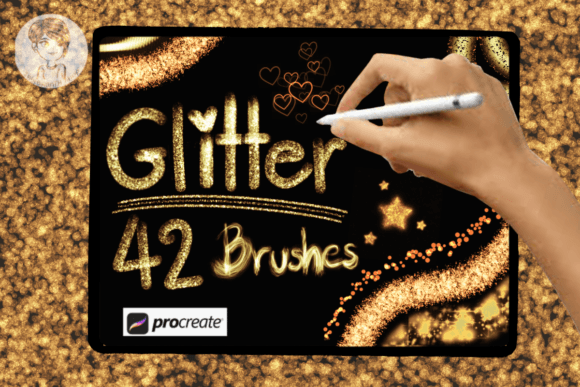
One of the most frequent mistakes creators make is assuming that high-quality brushes will automatically fix underlying artistic issues. A glitter brush is a texture tool, not a magic wand. If your underlying shading, lighting, or composition is weak, adding sparkle will only highlight those flaws rather than conceal them. The Glitter Brush Set for Procreate includes 42 distinct brushes designed with high clarity, but they require a solid foundation to shine.
For instance, applying a heavy glitter stamp over a flat, unshaded object often results in a disjointed image where the texture looks pasted on rather than integrated. To avoid this, always establish your light source and base colors first. Use the brushes to accentuate highlights and edges where light would naturally catch. This approach ensures that the glitter enhances the three-dimensionality of your work rather than flattening it.
Overlooking Scale and Resolution Settings
A critical technical detail that many users overlook is the importance of brush size adjustment. This specific set allows you to adjust brushes to three different sizes, up to the largest scale. A common error is using the default size for every element, regardless of the canvas dimensions. Using a small-scale glitter pattern on a large poster design can result in a muddy, indistinct texture that loses its impact when printed or viewed on larger screens.
Conversely, using the maximum size on intricate details like jewelry or eye makeup can overwhelm the subject. Before committing to your final design, test the brushes at various scales. Check how the clarity holds up when zoomed out. For branding and packaging projects, where consistency is key, define a standard size range for your glitter elements. This ensures that your visual identity remains cohesive across different mediums, from business cards to fabric prints.
Neglecting Color Harmony with the Included Palette
Another overlooked feature of this package is the included color palette. Many artists ignore this bonus, preferring to pick colors randomly from the wheel. This is a missed opportunity for efficiency and aesthetic cohesion. Glitter is not just white sparkles; it reflects the colors of its environment. Using the provided palette helps ensure that your glitter tones complement the rest of your artwork.
When creating greeting cards or marketing materials, color psychology plays a vital role. A harsh, neon glitter might clash with a soft, pastel background, creating visual vibration that is uncomfortable for the viewer. By utilizing the curated palette, you maintain a balanced look that feels intentional and professional. If you choose to deviate from the palette, do so with purpose, ensuring that your custom colors still harmonize with the overall mood of the piece.
Misunderstanding the Versatility of Procreate Stamps
There is a prevailing myth that glitter brushes are solely for fantasy art or children’s illustrations. This limitation severely restricts the potential of the Glitter Brush Set for Procreate. In reality, these stamps are incredibly versatile for commercial applications. Entrepreneurs and small business owners can use them to add a touch of luxury to product mockups, packaging designs, and social media graphics.
For example, a subtle glitter texture on a cosmetic brand’s logo can convey elegance and premium quality. Similarly, using these brushes on fabric design patterns can create unique, eye-catching textiles for fashion projects. The mistake lies in underutilizing the tool. Explore different blending modes within Procreate, such as "Add" or "Screen," to see how the glitter interacts with different backgrounds. This experimentation can reveal new ways to incorporate sparkle into corporate branding or editorial layouts without appearing childish.
Ignoring File Organization and Workflow Efficiency
Efficiency is crucial for professionals who bill by the hour or manage tight deadlines. A common inefficiency is failing to organize brushes into logical groups. With 42 brushes in this set, scrolling through a long list to find the right texture wastes valuable time. Take the initial ten minutes to categorize them by function—such as "Fine Sparkle," "Chunky Glitter," or "Star Bursts."
Furthermore, many users fail to save their favorite settings as presets. If you find a specific combination of size, opacity, and flow that works perfectly for your style, save it. This prevents the need to readjust parameters for every new project. By streamlining your workflow, you transform these brushes from a novelty into a reliable component of your professional toolkit.
Final Checks Before Commercial Use
Before delivering any client work or publishing your art, perform a final quality check. Zoom in to 100% to ensure the high clarity of the brushes has not been compromised by excessive compression or incorrect export settings. If you are designing for print, verify that the resolution is sufficient (typically 300 DPI) to prevent pixelation. Digital screens can be forgiving, but printed products like posters and packaging will reveal any lack of detail.
Additionally, consider the context of your audience. While glitter is fun and engaging, it should serve the message. Ask yourself if the sparkle adds value or if it distracts from the core communication. In educational materials or serious corporate reports, subtlety is key. In contrast, for party invitations or festive branding, you can afford to be more bold.
Ultimately, the Glitter Brush Set for Procreate is a powerful resource when used with intention and skill. By avoiding common mistakes related to scale, color harmony, and application context, you can create stunning, professional-grade artworks. Whether you are designing a greeting card, branding a product, or simply exploring your creativity, these tools offer endless possibilities. Take the time to learn their nuances, respect the technical requirements, and let your imagination guide the sparkle.